
Most notes start as a quick idea typed in a hurry. Then a teammate adds a line, someone fixes a heading, and suddenly three people are editing the same page at once. That is the moment a plain notes app starts to feel small, and it is exactly the problem HackMD was built to solve.
HackMD is a browser-based workspace where teams write notes together in Markdown, in real time. You type plain text with simple formatting marks, and everyone in the note sees the finished page update as you type. There is nothing to install, and the free plan covers the basics, so a beginner can open it and start writing in minutes.
This guide explains what HackMD is, how it works, its main features, the difference between the free and paid plans, and how to get started. By the end, you will know whether it fits the way you and your team write.
Table of Contents
– What Is It?
– How It Works
– Key Features for Teams and Beginners
– Free Plan and Paid Plans
– How to Get Started
– Who Should Use It?
– Tips for Beginners
– Frequently Asked Questions
What Is HackMD?
HackMD is a real-time, collaborative Markdown editor that runs in your web browser. It has been around since 2014 and is used by developer teams, open-source communities, researchers, students, and small teams who write documentation, meeting notes, specs, and shared guides together.
The idea is simple. Markdown is a plain-text way of formatting: you write a hash sign for a heading, asterisks for bold, and dashes for a list. It takes that simple format and adds the teamwork that plain text files cannot offer. Several people can edit the same note at the same time, see each other’s cursors, leave comments, and watch changes appear live.
Some people write the name as two words, hack md, and you may even see the mistyped search hackxd. They all point to the same tool. Think of it as Google Docs for Markdown: fast, browser-based, and built for writing together, but with the clean, portable format that developers and technical writers prefer.
Because notes are plain Markdown, they stay portable. You can copy a note out, push it to a code repository, or export it, and the text still makes sense anywhere. That portability is a big reason teams pick it over tools that lock notes into a private format.
How HackMD Works
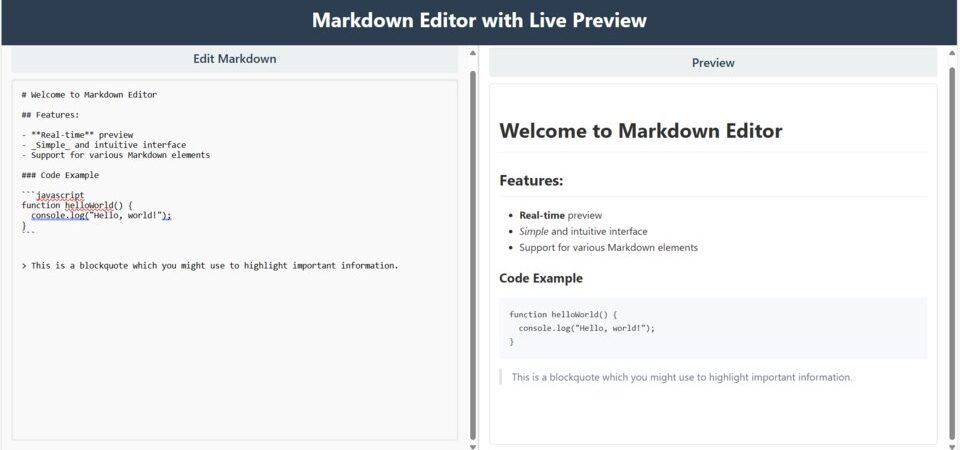
Using it feels closer to writing in a text file than to wrestling with a word processor. The screen is split into two parts, and everything updates as you type.
Write in Markdown
You write on the left side of the screen using Markdown. A single hash makes a heading, two asterisks make bold text, and a dash starts a list item. If you already know Markdown, there is nothing new to learn. If you do not, the basics take about ten minutes to pick up, and the toolbar helps with common formatting while you learn.
Code blocks, tables, checklists, and links all work with the same plain-text marks. That keeps notes readable even before they are rendered, which matters when you paste a note into a chat message or a code review.
See a Live Preview
The right side of the screen shows a live preview of the finished page. Headings, lists, links, and images appear formatted the moment you type them, so you always know what readers will see. You can hide either side when you want more room, or keep both open while you draft and polish.
This split view is the heart of the writing experience. It removes the guesswork of formatting, because the result is always visible next to the text that creates it.
Edit Together in Real Time
When you share a note, your teammates can open it and edit at the same time as you. Each person gets a coloured cursor, so you can see who is writing where. Changes appear instantly, without saving, refreshing, or sending files back and forth.
Comments and mentions keep the discussion inside the note. You can ask a question on one paragraph, tag a teammate, and get an answer without moving to email or chat. Emoji reactions add a light way to agree with a suggestion. Version history keeps earlier copies, so you can look back at how a note changed and roll back if an edit goes wrong.

Key Features for Teams and Beginners
The tool packs a lot into a simple editor. These are the features that matter most when you are deciding whether to use it.
Real-Time Collaboration
Live editing is the core feature. Multiple people can write in one note at once, with visible cursors and instant updates. Comments, mentions, and templates round it out, so a meeting note can start from a standard template and fill up live while the meeting runs. Guests can be invited to a note without joining the whole workspace.
Slide Mode
A note can become a presentation without leaving the editor. You split the note into slides with a special separator, and slide mode turns it into a deck you can present. This is handy for sprint reviews, talks, and demos, because the slides stay in the same place as the notes they came from, and a fix to the text updates the deck too.
Book Mode
Book mode turns a set of notes into a structured book. You list your notes in order, nest them under chapters, and the tool builds a collection with a table of contents and navigation. It suits onboarding guides, handbooks, course material, and any long document that would be awkward as a single page.
Diagrams and Math
Technical notes often need more than words. The editor supports diagrams written in plain text, including Mermaid, PlantUML, and Graphviz, so a flowchart or sequence diagram lives beside the text that explains it. Math works too, through MathJax and KaTeX, which render formulas from LaTeX-style notation. Both features keep the note as plain text, so diagrams and equations stay editable and version-friendly.
GitHub Sync
For teams whose documentation lives in a code repository, GitHub sync is a strong reason to choose this tool. Notes can be pushed to GitHub and pulled back, so the shared writing space and the repository stay in step. The free plan includes a limited number of pushes each month, and paid plans raise the limit. GitLab sync is supported as well, and a REST API and command-line tool are available for teams that want to automate their docs.
Publish and Export
A finished note can be published as a public web page with its own link, so readers do not need an account to read it. Notes can also be shared privately with chosen people or kept to the workspace. When you need the text elsewhere, you can export a note as a Markdown file, and paid plans add PDF export. Templates help teams start meeting notes, specs, and retros in the same shape every time.
Free Plan and Paid Plans
There is a free plan and paid plans, and the free plan is generous enough to learn the tool properly. It includes unlimited notes and up to three teammates per workspace, plus templates, comments, and real-time editing. The limits that matter most on the free plan are the small ones: a limited number of GitHub pushes each month, a limited number of API calls, images up to a small size, and only the most recent versions kept in history. Full-text search and PDF export are not part of the free plan.
Paid plans, sold under the Prime name for Personal, Team, and Enterprise use, raise those limits and add the features a larger team needs: full-text search across notes, PDF export, unlimited version history, bigger image uploads, more API calls, and admin controls. Enterprise adds sign-on and permission controls for organisations. Plan details change from time to time, so check the current pricing page before deciding.
The practical rule is simple. Start free and use it for real work for a few weeks. If a limit blocks something you do every day, that is the moment a paid plan earns its place. Paying before that usually buys features you never touch.
How to Get Started
Getting started with hackmd takes only a few minutes. Follow these steps, and you will have your first shared note before the day is over.
- Create a free hackmd account and open a new note. The editor opens with a blank page and a short welcome text you can replace.
- Write a short note in Markdown. Try a heading, a list, and a bold line, and watch the preview update beside your text.
- Share the note with one teammate. Send them the link, and ask them to edit a line while you watch their cursor move.
- Try a template. Meeting notes are a good first template, because the structure is familiar and the team can fill it in live.
- Publish a small note. Pick something harmless, like a team reading list, publish it, and open the public link to see how readers will find it.
- Organise what you make. Give notes clear titles, group related notes, and try book mode once you have more than a few pages on one topic.
After a week of daily use, the habits settle in. Short notes, clear titles, and one shared place for each topic do more for a team than any single feature. If you want a wider view of the category first, this roundup of tools that help you think better puts note-taking apps beside mind maps, calendars, and focus timers, so you can see where a collaborative notes tool fits in your own setup.
Who Should Use It?
HackMD suits anyone who writes with other people and likes plain text. Developer teams use it for specs, runbooks, and design notes. Open-source projects use it for shared documentation and hackathon notes. Teachers and students use it for class notes and group projects. Small teams use it for meeting notes and internal guides, because everyone can edit and nobody has to ask for the latest copy.
It is a weaker fit if your team never writes together, or if you need a full office suite with spreadsheets and slide design. It is also browser-based, so it is not the right pick if you need a fully offline desktop app. For shared writing in Markdown, though, it is one of the most direct tools available.
Tips for Beginners
A few habits make the first weeks smoother.
Keep notes short and give each one a clear job. One note per meeting, per decision, or per guide is easier to find than a single long page that tries to hold everything.
Use templates for anything you write more than once. A meeting template with headings for decisions and action items saves more time than any shortcut.
Name things the way you search for them. A note titled with the project and the topic turns up fast, while a note called “notes” disappears into a pile.
Review before you publish. A quick read in preview mode catches broken links and stray formatting, and it is the last chance to tidy a note before readers see it.
Frequently Asked Questions
What is HackMD used for?
HackMD is used for writing notes together in Markdown, in real time. Teams use it for meeting notes, specs, documentation, guides, and shared research, and it can also turn notes into slides or a structured book.
Is HackMD free to use?
Yes, HackMD has a free plan with unlimited notes and up to three teammates. Paid plans add more capacity and features like full-text search, PDF export, and unlimited version history.
Does it work offline?
It runs in the browser, so it needs an internet connection for live collaboration. Notes can be exported as Markdown files, which you can keep and read anywhere.
Can I use it without knowing Markdown?
Yes. The basics take about ten minutes to learn, and the toolbar covers common formatting. You can write plain text first and add formatting as you go.
How is it different from Google Docs?
Google Docs is a general word processor, while this tool is built for Markdown. Notes stay as portable plain text, work well with code repositories, and turn into slides or books from the same file.
For more simple tech guides, visit the Excel Mind Agency blog.